General Industry offers you the possibility to make an offer request very easy and fast.
We further present the steps which you have to follow for initializing an offer request.
 First enter the "Distribution" page from the top menu and select the desired manufacturer from this page.
In a manufacturer’s page, in the left box you will find the product categories, and in the right box their description along with the products which belong to the selected category. Where available, all the products from the selected category will be listed in the right box, and for each product you will have displayed its code, a short description and a field in which you can decide the quantity for making an offer request.
To add the product in the request list, you will have to fill the "Quantity" input and press the "Add to request" button. After that, you will receive a confirmation message (Product added to the list!) in the right of the "Add to request" button.
*Note! The provided value for the quantity input, must be greater than 0 an smaller than 9999, or else the product will not be added to the request list.
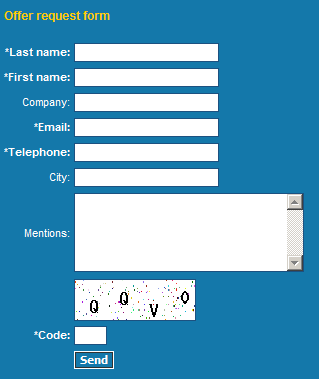 The last step is to fill in the form provided on the bottom of the page and push the send button.
*Note! The Last name, First name, Email/Telephone and Code fields are mandatory. If one of them is left blank, your request will not be processed.
*The Code field will be filled in with the 4 characters from the image displayed above this field.
After sending the offer request, you will receive a confirmation message.
We further present the steps which you have to follow for initializing an offer request.
First enter the "Distribution" page from the top menu and select the desired manufacturer from this page.In a manufacturer’s page, in the left box you will find the product categories, and in the right box their description along with the products which belong to the selected category. Where available, all the products from the selected category will be listed in the right box, and for each product you will have displayed its code, a short description and a field in which you can decide the quantity for making an offer request.
To add the product in the request list, you will have to fill the "Quantity" input and press the "Add to request" button. After that, you will receive a confirmation message (Product added to the list!) in the right of the "Add to request" button.
*Note! The provided value for the quantity input, must be greater than 0 an smaller than 9999, or else the product will not be added to the request list.
After selecting the products, by clicking the "Offer request" button in the top menu or the "See the offer request list" link, you will be able to visualize the added products at that point; you can modify the quantity for each product or have the possibility of removing products from the list.

The last step is to fill in the form provided on the bottom of the page and push the send button.
*Note! The Last name, First name, Email/Telephone and Code fields are mandatory. If one of them is left blank, your request will not be processed.
*The Code field will be filled in with the 4 characters from the image displayed above this field.
After sending the offer request, you will receive a confirmation message.